Length, reset time and start times
Set how long a service takes, the gap between clients, and how often start times are offered.
These three settings control which times clients see for a By appointment service.
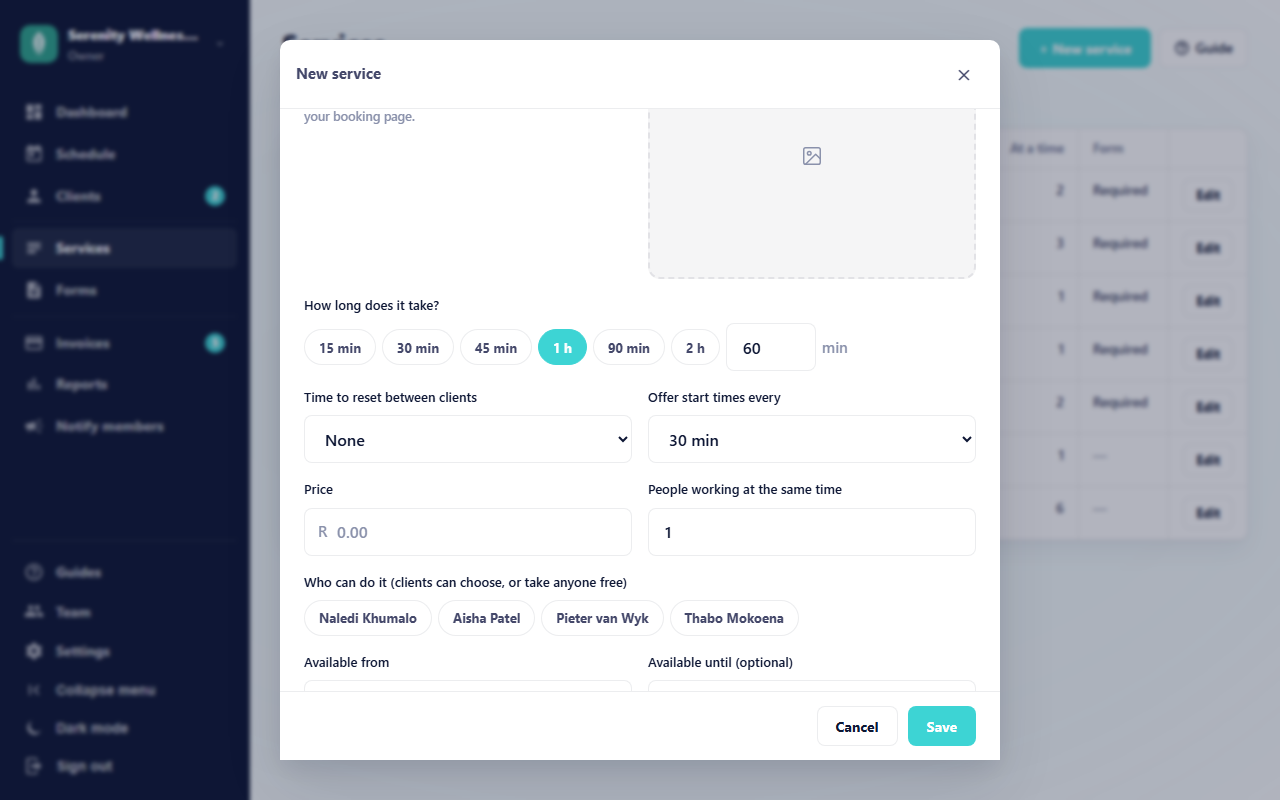
Steps
- Go to Services and tap Edit on the service (or tap + New service).
- Make sure it is set to By appointment.
- Under How long does it take?, tap a length (15 min, 30 min, 45 min, 1 h, 90 min, 2 h) or type your own number of minutes.
- Under Time to reset between clients, choose a gap from None up to 60 min.
- Under Offer start times every, choose 15 min, 30 min or hour.
- Tap Save.
Example
A 60-minute service with a 15-minute reset, offered every 30 minutes, with hours of 09:00 to 13:00: clients can start at 09:00, 09:30, 10:00 and so on, as long as the booking plus its reset fits. The reset time is kept free after each client.
Which step to choose
- Every 15 min gives clients the most choice but can leave awkward gaps.
- Every 30 min is a good everyday choice.
- Every hour keeps the day neat if your services are all about an hour.
Related guides
Create, edit and stop offering a serviceAdd something clients can book, change it later, or take it off your page.By appointment or fixed times: which to chooseAppointments suit one-to-one work. Fixed times suit classes and set sessions.Set your opening hoursTell the app when you work, so clients can book the free time inside.