WhatsApp messages: what is sent, who gets it and what it costs
Optional automatic WhatsApp updates to clients, paid for from a wallet you top up.
WhatsApp updates are optional and are switched off for every business until you turn them on. Email confirmations and reminders keep working either way.
What clients get
- Booking confirmed.
- A reminder the day before.
- A message if the booking is moved or cancelled.
- A notice when they come off the waitlist.
- A notice that an invoice was sent.
Who gets them
Only clients who agreed. They agree by ticking the WhatsApp box when they book (it appears when you have WhatsApp on and they typed a phone number). You can also tick it on their client record, or when you book a new client for them.
- The client can stop updates themselves from their booking link with “Stop WhatsApp updates”, and turn them back on there.
- You can untick it on their record too.
- Messages come from the SimpleApps number, tell the client not to reply, and link back to you.
What it costs
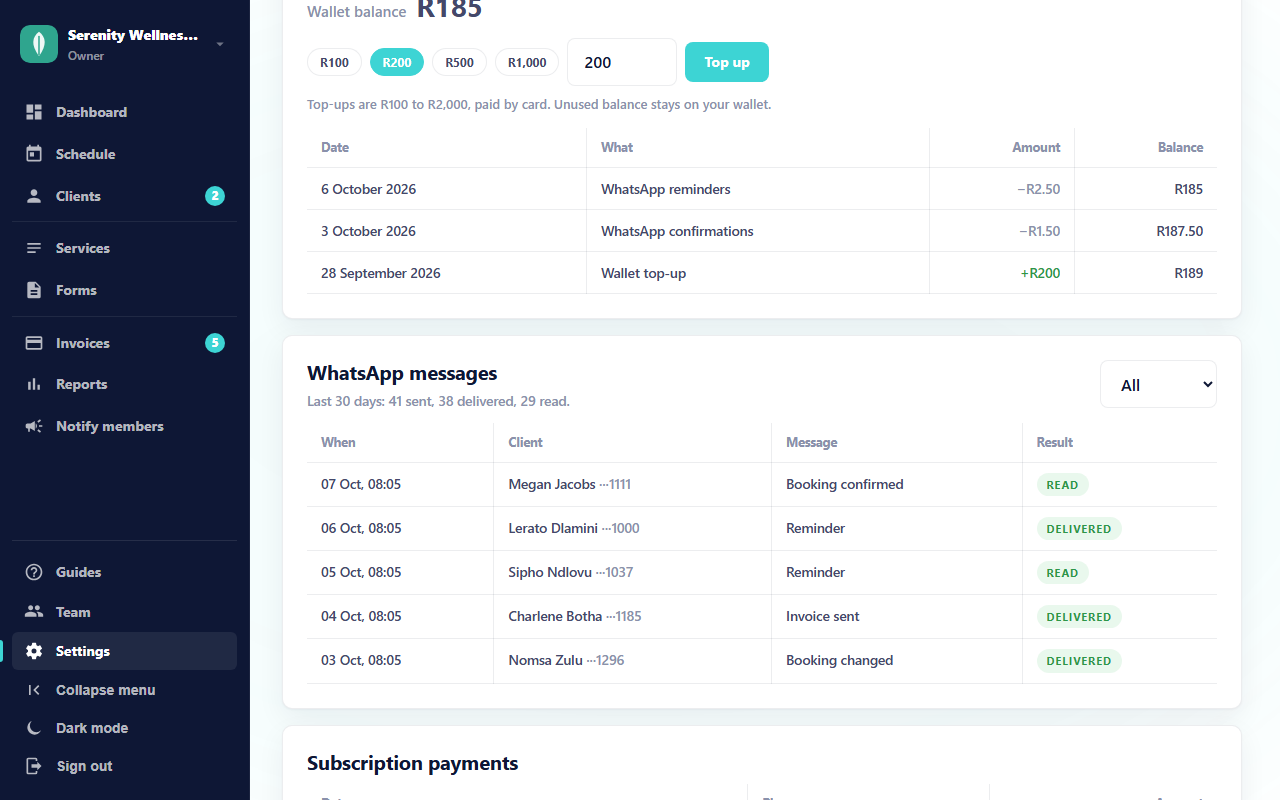
Each message costs R0.50, taken from your wallet only when it is sent. A message that fails is refunded. The wallet is only for WhatsApp, it never pays your subscription. Top-ups are R100 to R2,000, paid by card.
Low and empty wallet
- Under about R5 the wallet counts as low. You see a warning with roughly how many messages are left, and we email you once.
- When it runs out, WhatsApp is paused and you get an email. Bookings and email carry on as normal.
- Top up and WhatsApp resumes straight away.
- Any warning also shows as a banner at the top of your screens, with a “Top up” link.
Seeing what was sent
Settings, Billing has a WhatsApp messages list: when, which client (name and last 4 digits), which message, and the result: Waiting, Sent, Delivered, Read, Failed or Not sent, with a plain reason. You can filter it.