The waitlist and promoting a client
What happens when a session is full, and how to give someone a place.
When a session is full, clients can join its waitlist instead. They are only booked when you promote them.
Steps
- Look for "+N waiting" on a session, or "On a waitlist" on your Dashboard.
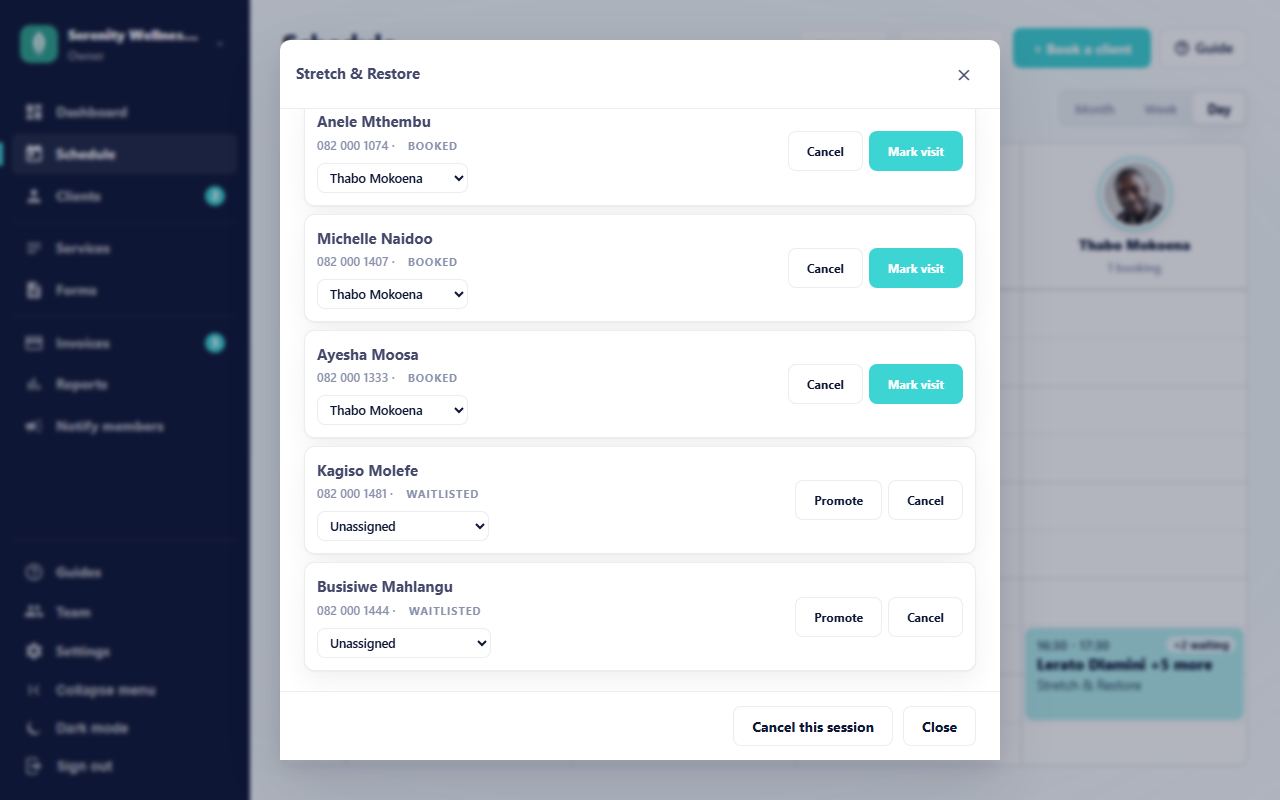
- Open the session on the Schedule.
- Find the client whose status shows waitlisted.
- Tap Promote.
- Read the note under their name. It tells you whether they were emailed.
What the client gets
- If they have an email address, they are emailed that they now have a place, with how to manage it.
- If they have no email, the note says so. Please tell them yourself.
- If the session has already started, no email is sent.
Rules to know
- Online, a full session never lets extra people in. Only you can promote.
- You may promote someone past capacity on purpose.
- Open a session and tap Cancel on a booked client to free a place, then promote the next person.
- Waitlisted clients are not asked for a required form until promoted. The session flags their form as pending.
Related guides
Capacity, couples and party sizeHow many people fit at once, and how bookings for two or more are counted.Attach a form to a serviceAsk clients to fill in a form (such as a health questionnaire) when they book.The Dashboard explainedWhat each tile, list and button on your home screen means.Mark a visit: attended, no-show or cancelledRecord what happened after the appointment, and cancel bookings or sessions.