How to subscribe, switch plan or cancel
Choose a plan, change it, and stop it at the end of the period.
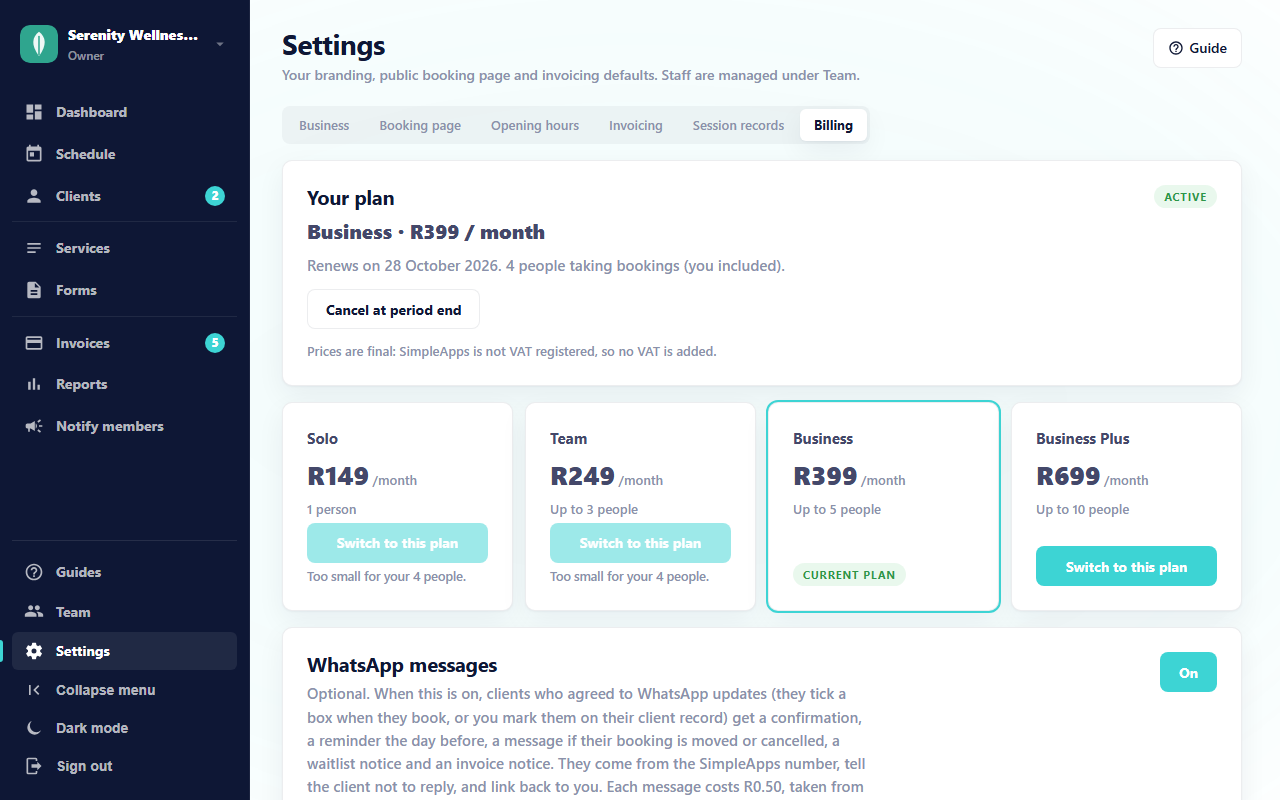
Steps
- Open Settings and click the “Billing” tab.
- Look at the four plan cards.
- Click “Choose plan” on the one you want. If you already subscribe, it says “Switch to this plan”.
- Pay by card on the secure payment page.
- You return to Billing. Your plan shows as Active, with the renewal date.
Cancelling
- Click “Cancel at period end”. Your plan ends on the date shown and you keep full access until then.
- Changed your mind before then? Click “Keep my plan”.
- Nothing is deleted when a plan ends.
Plan cards that are not clickable
- “Too small for your N people”: you have more active people than that plan covers. Choose a bigger plan, or deactivate people under Team.
- “Opening soon”: that plan cannot be bought yet.